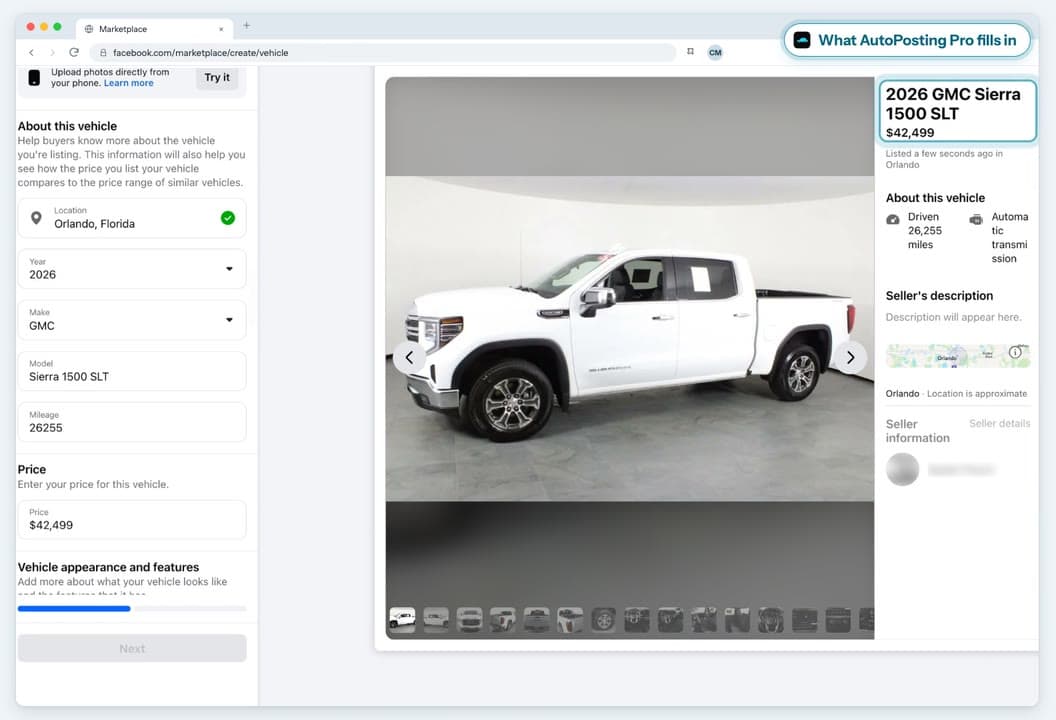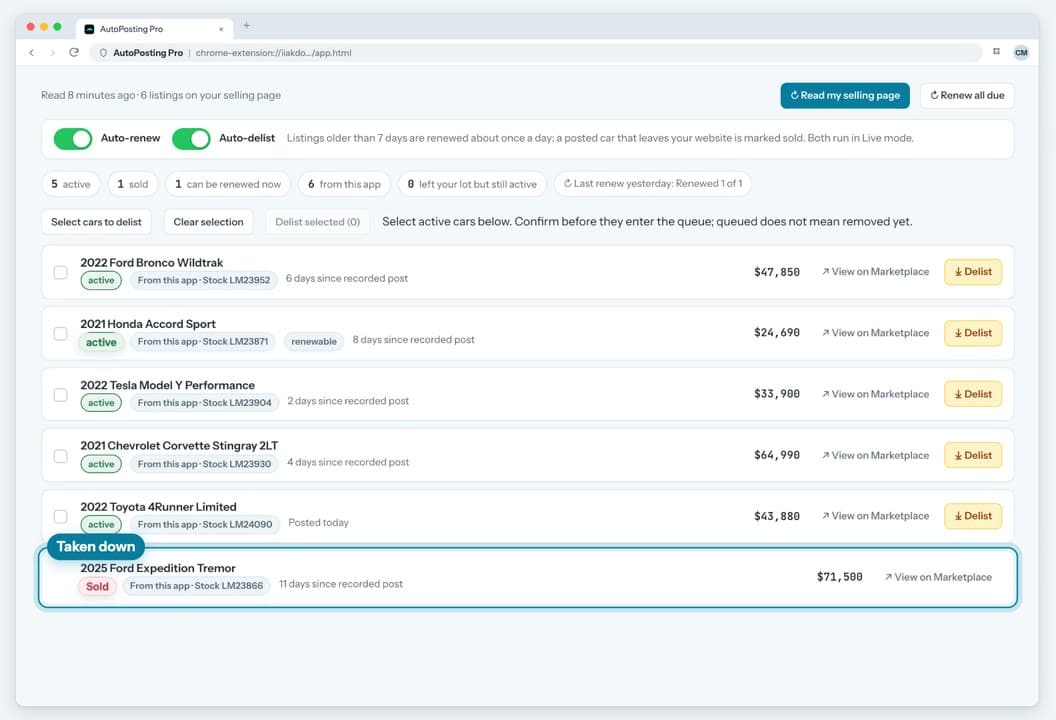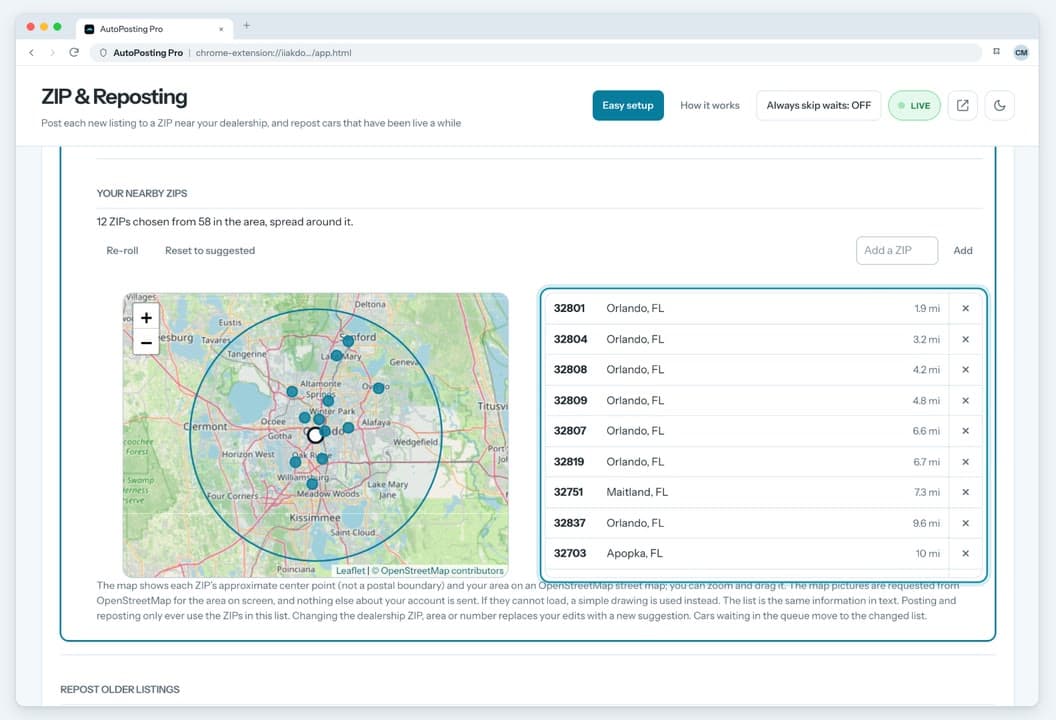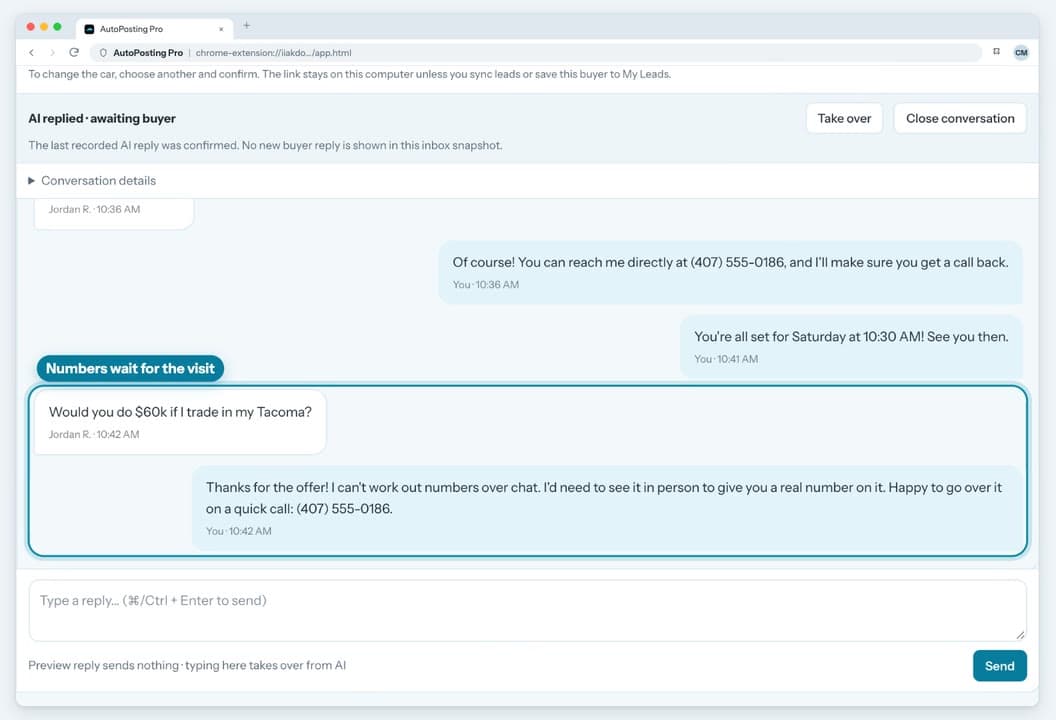
Your lot. Your listings. Your next conversation.

Facebook Marketplace software for car dealers.

Turn your dealership's website inventory into listings that sound like you. Prepare the caption, choose the photos, and post from the Facebook account already signed into Chrome. Keep the buyer conversation close.

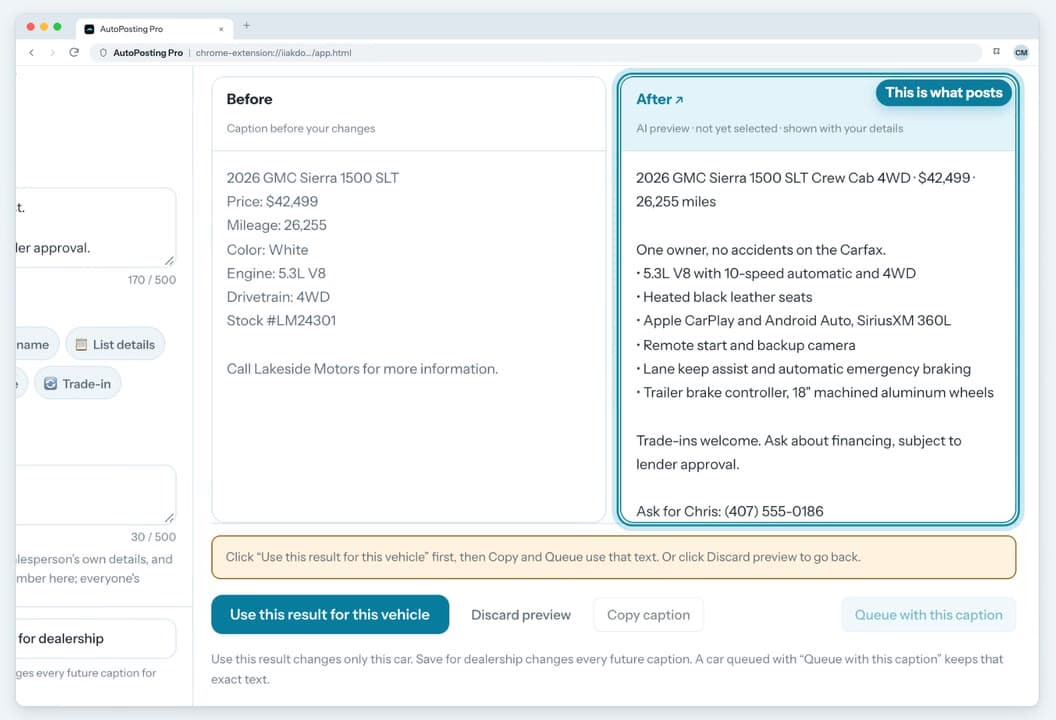
  • AI captions
  • AI photos · Studio
  • Buyer messages

Individual: $9.90 first month, then $29.90/mo · cancel anytime

Works with any public dealership inventory website. Verified inventory in 3 days—or your first month back. See guarantee terms

Studio is available now—with AI photo editing and reviewed AI buyer replies.

What’s available today and what’s in the preview

Chrome Web Store installs the public extension today. It includes Marketplace Messages and a customizable salesperson-written first-response template with delay, test-mode and one-reply-per-conversation safeguards. Studio subscribers also have AI photo editing and inventory-grounded buyer drafts; Individual does not include those tools, and Studio is available now. In the public release: Every AI-written buyer reply stays unsent until a salesperson approves it, confirming the exact words and recipient. The screens below are an interface preview, not the public install.

Chrome extension Phone remote
Inside the Chrome extensionReal screens · demo data
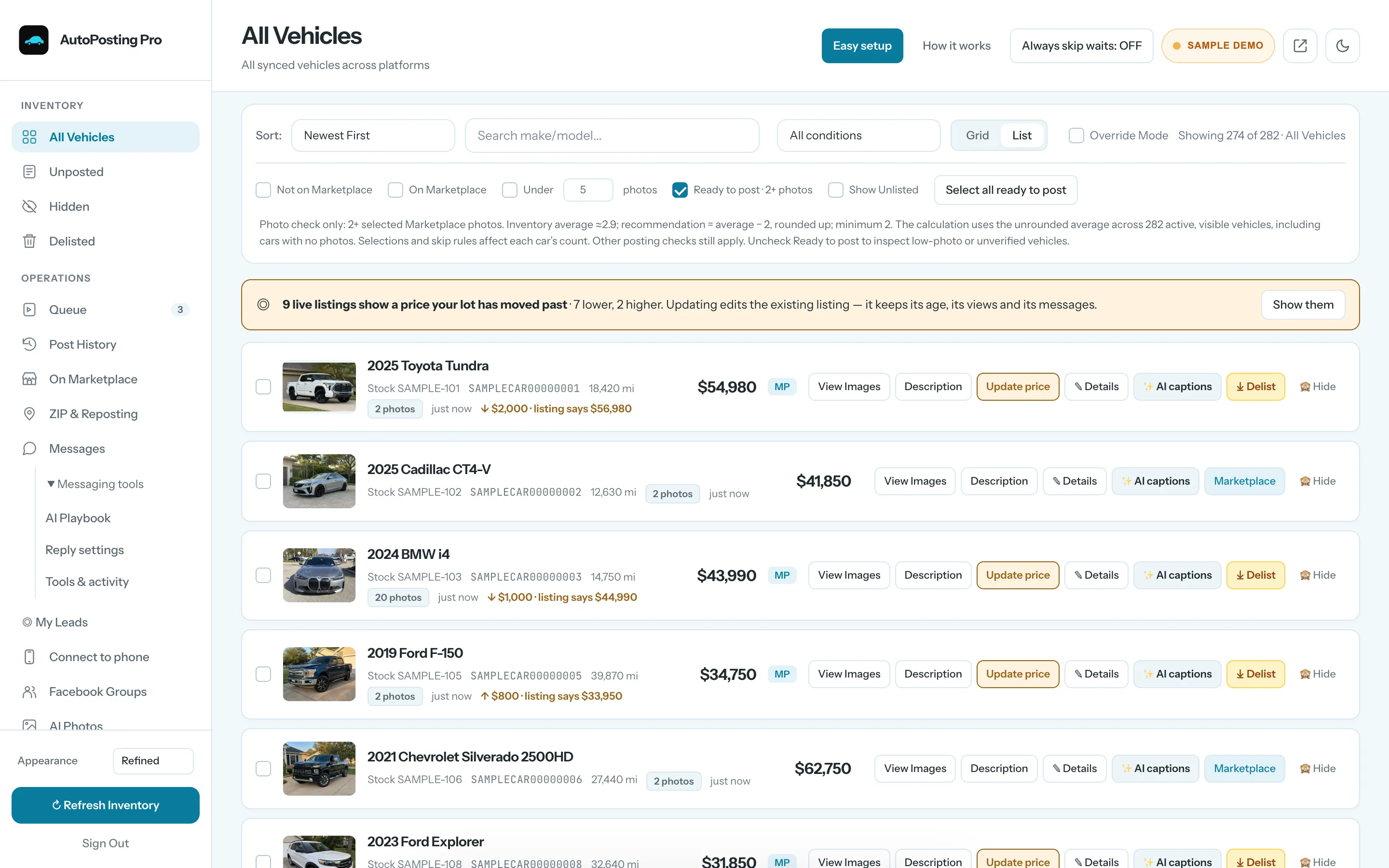
AutoPosting Pro · Inventory · Sample Data
Current light-blue AutoPosting Pro inventory interface with fictional vehicles and observed buyer-message counts

Current light-blue UI · illustrative demo · no real messages or posts

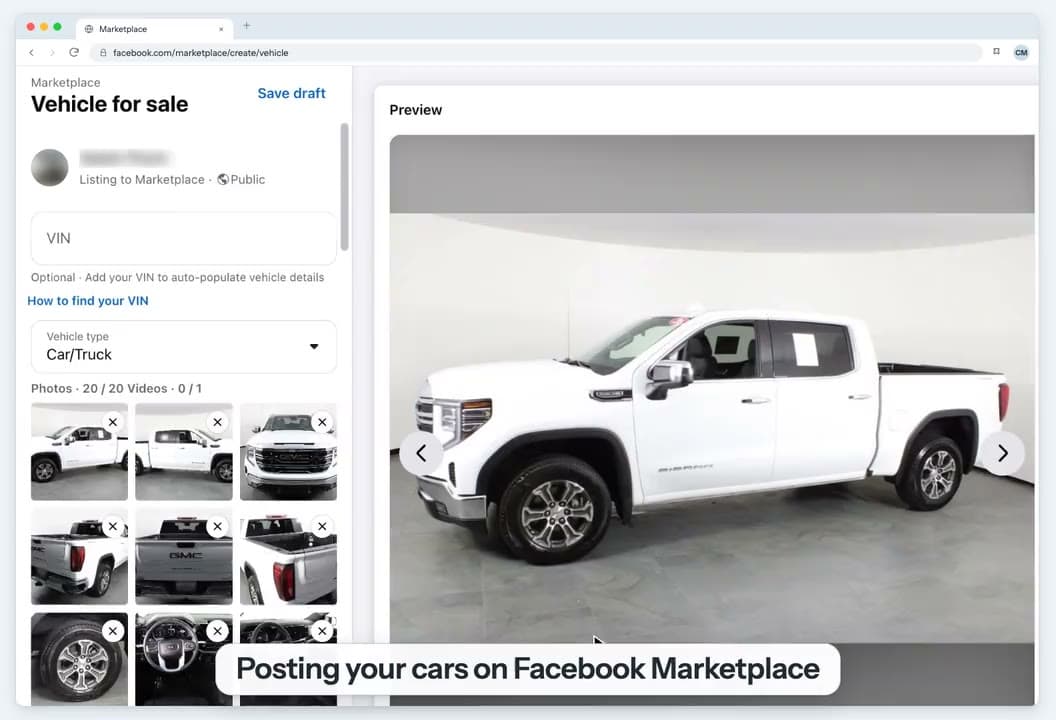
Watch Dustin’s walkthrough · 10 min

The walkthrough was recorded in an earlier build. The saved screenshots above preview the updated interface with fictional demonstration data.

Founder walkthrough · 10 min · core workflow
Measured from the database · refreshed hourly
4,581
vehicles in active inventory
79,729
photos on active inventory
1,456
successful posts across connected channels
19
active rooftops

“I love the app because they can leave the desk and go get ups while they get leads directly to their phone on Facebook Messenger and Instagram.”

Kristian · Sutherlin Nissan

Our first dealership, and the store our founder works at. Why we say that out loud

18+ makes on lots we manage

Nissan · Hyundai · Ford · Toyota · Chevrolet · Jeep · Mitsubishi · Honda · Kia · Genesis · Tesla · BMW · Volkswagen · Mazda · Mercedes-Benz · Audi · Infiniti · GMC

// Your Facebook session

Posts like a patient person. Keeps the salesperson in control.

Every listing goes out from your own Facebook, on a visible schedule you control. Buyer conversations stay with the salesperson who owns the account.

// Account safety

Your Facebook, your pace.

There is no shared tool account and no third-party API between you and Marketplace. The extension posts from the Facebook account already open in your Chrome. Marketplace conversations remain in that salesperson's account, where the team can continue them.

  • One car at a time, with daily limits you can see and change
  • If Facebook shows a warning, the queue pauses on its own and resumes later
  • Per-vehicle renew and delist tools prefer a recorded listing link but can fall back to title matching; review the result.
  • Meta controls Marketplace access. No posting tool can promise that an account will never be limited.
Queue · live activity · daily limits
Seeded demo of the AutoPosting Pro preview Marketplace queue showing selected vehicles, photo progress, human pacing and a log that no external listing was created
Seeded demo · Preview UI · no external listing created
// Messenger
Studio-gated in the public extension · updated review-flow preview

AI drafts the routine. A salesperson takes the decision.

Marketplace buyer messages remain in the salesperson's own account. For Studio subscribers, the public extension can use the verified vehicle record and dealership playbook to prepare an inventory-grounded AI draft. The draft never auto-sends: the salesperson must confirm the exact words and recipient before sending. The preview shows an updated interface and review flow with the same confirmation boundary. Studio is available now.

  • Your Messenger account and your dealership-approved reply instructions
  • The vehicle price, mileage, description and features stay in view
  • Every AI draft stays unsent until the salesperson confirms the exact words and recipient
Messages · light-blue workspace · human handoff
Current light-blue Messages interface with a fictional buyer's trade-in question, an unsent draft, vehicle activity and a salesperson handoff
Current UI · sample conversation · unsent draft · the salesperson handles trade and final-price decisions
Start for $9.90

$9.90 first month, then $29.90/mo · cancel anytime

Studio-gated in the public extension · updated interface preview · included with Studio
// AI photo studio · Studio subscribers

Lead with the car. Keep the conversation.

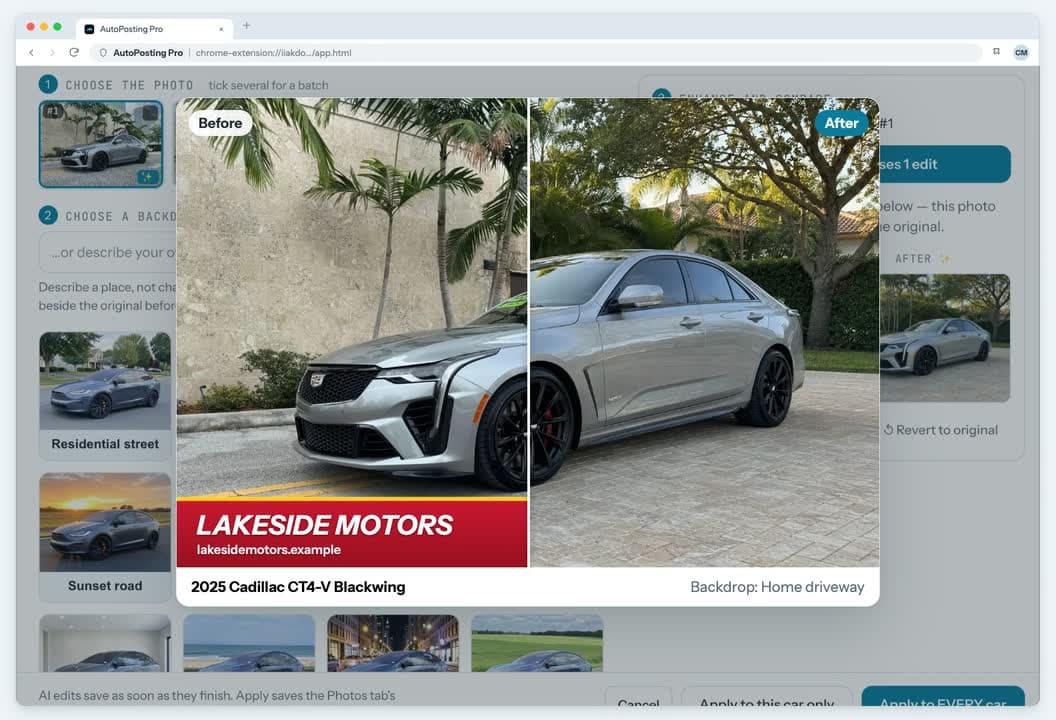
The public extension already includes Studio-gated, vehicle-first photo editing for Studio subscribers. Every result stays beside the original for review. The screen shown here previews the updated interface; Studio is available now.

// 6 REAL DEALERSHIP SOURCES

6 source photos shown with customer permission. Select a vehicle to compare the dealership original with an AI-generated residential edit.

Aspect ratio preserved
AI redraws the complete frame. Compare body shape, paint, wheels, trim, accessories, wear and damage with the original before use. The generated setting is not the vehicle's actual location.

Sugar Loaf CDJR

2023 Ford Explorer XLT

Source photo shown with permission · 1 of 6
Dealership source
Sugar Loaf CDJR source photo of a white Ford Explorer XLT at the dealership with a dealer plate and yellow 2023 windshield sticker
AI-generated editSynthetic setting
AI-generated rendition based on the white Ford Explorer XLT source photo, placed in a Minnesota home driveway without dealer advertising or windshield stickers
Dealer plate, year sticker and dealership settingMinnesota home driveway

Source photos are shown with customer permission. AI can alter vehicle details, so every result must be compared with the original for color, wheels, trim, accessories, wear, damage and condition. Keep the edit only if it passes review, or return to the original. These examples demonstrate the editing workflow—not guaranteed clicks, leads or sales. Residential settings are AI-created concepts; they do not claim a vehicle was photographed at that property.

// CHOOSE A SETTING OR WRITE YOUR OWN

Start with a driveway, residential street or clean studio preset—or describe the setting you want. One car's approved edits can share a setting so the gallery reads as one set.

The same vehicle rendered against the indoor showroom backdrop
Indoor showroom
The same vehicle rendered against the residential street backdrop
Residential street
The same vehicle rendered against the sunset road backdrop
Sunset road
The same vehicle rendered against the white studio backdrop
White studio
The same vehicle rendered against the city skyline backdrop
City skyline
The same vehicle rendered against the coastal road backdrop
Coastal road
The same vehicle rendered against the mountain road backdrop
Mountain road
The same vehicle rendered against the city at night backdrop
City at night
// WHAT IT WILL NOT DO

A listing photo is a claim about a specific vehicle. Studio focuses on the presentation, but AI redraws the full frame and can occasionally alter vehicle details.

  • A written backdrop describes a place. It is refused if it reads as an instruction to change the car.
  • Compare the vehicle, color, wheels, trim, and visible wear or damage against the original before keeping an edit.
  • Written backdrops work one car at a time, with the before and after side by side, so nothing is applied to a lot of cars unseen.
  • You approve every photo before it goes anywhere. Nothing posts because the studio liked it.

AI Photo Studio is included with Studio in the public extension. Studio is available now, separately from Individual. The screenshot previews the updated interface and review flow rather than a newly introduced feature.

// Where it runs

One account. Chrome plus phone control.

Use the Chrome extension for inventory and Marketplace, then control that computer from your phone while Chrome remains online.

The main app

Chrome extension

Facebook Marketplace

Runs inside Chrome, reads your dealership inventory locally, uploads it after validation, drafts captions, and posts to Marketplace through the Facebook session already signed in to that Chrome profile.

  • Site-specific local reader with verified cloud upload
  • Queue with daily limits and a live log
  • Selected Groups, guarded lifecycle checks, and Marketplace Messages
  • Studio subscribers already have Studio-gated photo tools and unsent AI buyer drafts in the public extension
Add to Chrome

Chrome Web Store · automatic updates

Interface preview
These exact screens and their updated review behavior await Chrome Web Store upload and approval. The public extension already includes Studio-gated AI photo editing and inventory-grounded buyer drafts for Studio subscribers. AI buyer drafts never auto-send and require confirmation of the exact words and recipient. Studio is available now.

Phone remote control

Any phone · nothing to install

Open the portal on your phone to browse inventory and monitor activity while your computer and Chrome are online.

  • Shows which computer is online
  • Browse the live inventory and its photo galleries from the lot
  • Review buyer context and send a reply through that computer

Already a customer? Your available tools are on the Downloads page of your portal.

// How it works

Three steps to set up. $9.90 to find out.

Paste your website, add the extension, queue the lot. Then it runs at a human pace while you sell.

01

Paste your website address.

There is no fixed dealership-vendor list. The local reader is built for your site, then VINs, prices, mileage and vehicle-owned photo galleries are verified before the cloud inventory is updated.

02

Add the Chrome extension and sign in.

It posts from the Facebook account already open in Chrome. The phone remote can browse inventory and monitor activity while that computer remains online.

03

Queue the lot.

Your verified vehicle facts feed an editable caption. Cars go out one at a time; current renewal, delisting and buyer follow-up controls use the same vehicle record and still require review.

Diagnosing missing vehicles, one-photo records, or galleries mixed with other cars? Use the dealership inventory verification checklist.

// Pick a plan

Every available plan includes the Chrome extension and phone control of an online AutoPosting Pro computer.

Start here
Solo salesperson

Individual

$9.90 first month
then $29.90/mo · cancel anytime
  • Chrome extension and phone remote for an online computer
  • Verified website inventory, editable Marketplace copy, human-paced queue
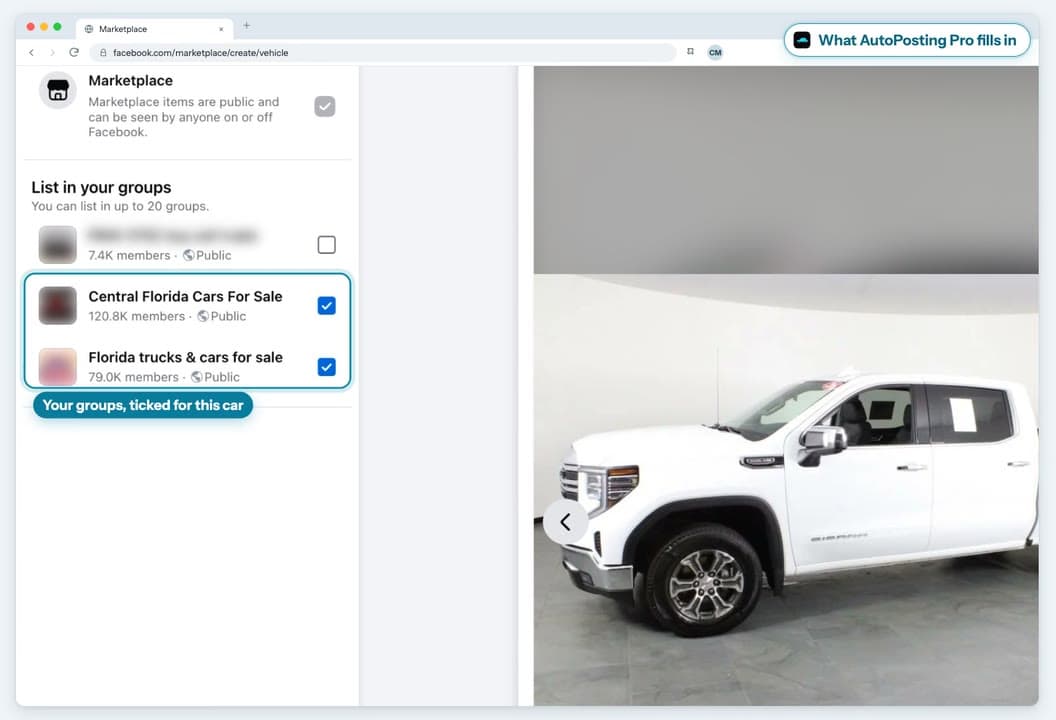
  • Eligible renew/delist actions and selected Facebook Groups
  • Buyer-message tools and app-observed lot insights
Solo salesperson · AI studio

Studio

$99.90/mo
available now · cancel anytime
  • Everything in Individual
  • The public extension: AI-assisted photo edits with dealer review and original fallback
  • Inventory-grounded AI buyer drafts that require confirmation of the exact words and recipient
  • Preview: updated interface and review flow
  • Optional Boost workflow with visible budget and payment checks
Whole team

Dealership

$99.90 first month
then $399.90/mo · cancel anytime
  • Everything in Individual
  • Unlimited team seats during launch
  • Owner, manager and staff roles
  • Shared inventory, team activity and lead feed
  • Boost for the whole lot
  • Studio AI add-on for the whole lot is not currently sold or included

Pay yearly and get 12 months for the price of 10

// Inside the app

Your workspace, from inventory to conversation.

The current light-blue interface throughout: inventory, photos, conversations, leads and the posting queue. All use fictional demonstration data, not real customer results. Marketplace lead sync is shown as a preview until the matching extension update is published.

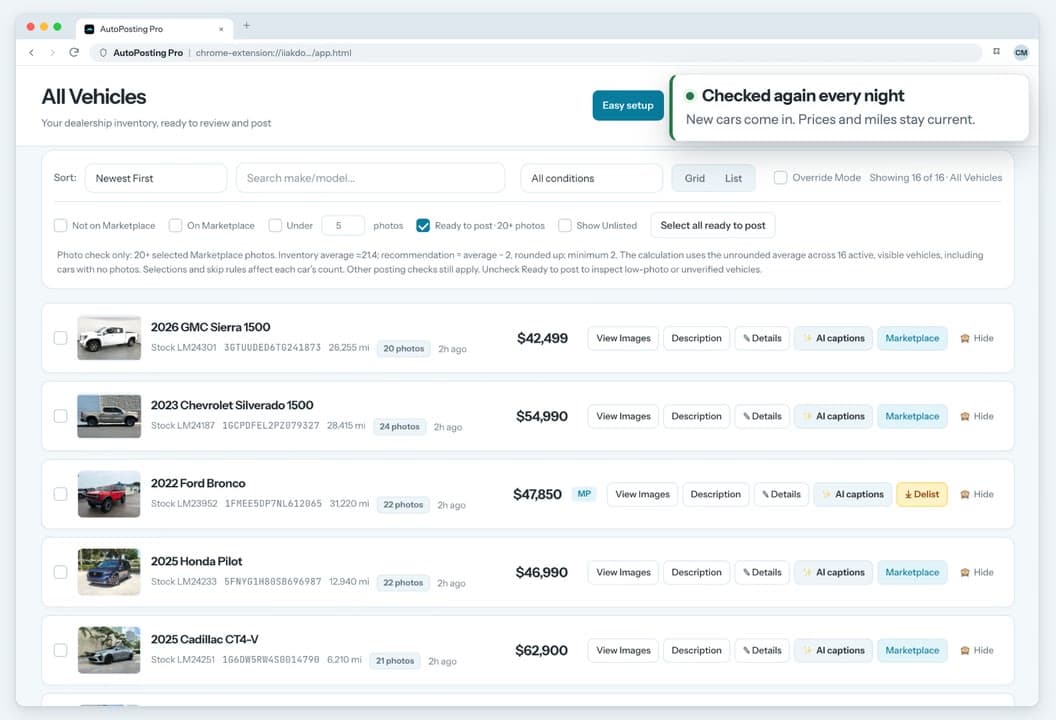
AutoPosting Pro · Inventory · Sample Data
Current light-blue AutoPosting Pro inventory interface with fictional vehicles and observed buyer-message counts

Current light-blue UI · illustrative demo · no real messages or posts

// The Chrome extension, screen by screen
Seeded demo of the real AutoPosting Pro AI-assisted photo review showing the original vehicle photo beside a generated background and a Revert to original control
03 · AI-assisted photos, reviewed by you
Seeded demo of the AutoPosting Pro Messages tab showing an inventory-grounded unsent draft and a human handoff for trade and final-price decisions
04 · Messages, unsent draft and salesperson handoff
Seeded demo of the real AutoPosting Pro photo review dialog with a fictional example vehicle’s 19-photo gallery
02 · One vehicle’s 19-photo gallery
Seeded demo of the real AutoPosting Pro Marketplace queue with four example vehicles, photo progress, human pacing and a log stating that no external listing was created
05 · Every queue step stays visible
// Also in the box

Facebook Groups

Every plan

Include selected groups when Facebook presents them during the Marketplace publishing flow.

Photo controls

Every plan

Review the VIN-owned gallery, hide dealership banner frames and choose the lead image before queueing.

Lot insights

Every plan

Days-to-sell by model and body style, from your own lot.

AI-assisted photo backdrops

Studio subscribers

Studio-gated in the public extension for Studio subscribers: try a clean studio, driveway or street background and review the result beside the original. Studio is available now; the preview shows an updated interface.

AI buyer drafts

Studio subscribers

Studio-gated in the public extension for Studio subscribers: prepare an inventory-grounded draft, then confirm the exact words and recipient before it can send. The interface preview keeps the same review requirement.

Boost

Studio · Dealership

Open an optional Facebook ad workflow with visible budget controls. Availability depends on Facebook and the account's payment setup.

Team seats and roles

Dealership

Owner, manager and staff logins. Each salesperson posts under their own account.

Start for $9.90

$9.90 first month, then $29.90/mo · cancel anytime

// The difference

One vehicle record, from inventory to listing lifecycle.

Other products cover parts of this workflow too. This table states how AutoPosting Pro works and sends named-product comparisons to the source-linked library instead of grading an undefined category.

// FEATURE
// US
AutoPosting
Pro
// OTHER PRODUCTS
Compare by
vendor
// IN-HOUSE
Doing it
by hand
Verified site reader with last-known-good protection and per-car corrections
see named comparisons
One car at a time from your signed-in Facebook, with visible limits and warning pauses
see named comparisons
Caption, VIN-owned photo review and Marketplace lifecycle share one vehicle record
see named comparisons
Lifecycle controls prefer a recorded listing link, with title fallback and review
see named comparisons
Visible queue, progress log, daily limits and phone inventory/activity controls
see named comparisons

For named, source-linked comparisons, see the comparison library.

// FAQ

Questions, answered.

Will Facebook ban my account?

Every post publishes from your own signed-in Facebook through a queue that runs on a human pace with daily limits, one car at a time. If Facebook shows a warning, the queue pauses instead of pressing ahead. Meta controls Marketplace eligibility and enforcement, so no automation can promise that an account will never be limited. AutoPosting Pro shows the queue and its stop reason so the salesperson remains in control.

How does my inventory get in? Do I need a DMS feed or a CSV?

No feed or CSV is required, and there is no fixed dealership-vendor list. AutoPosting Pro runs a site-specific reader in the customer's Chrome session, uploads the complete candidate, and verifies its VINs, pricing, mileage and vehicle-owned galleries before a cloud update. If a refresh is empty, sharply smaller or otherwise uncertain, it is held for support while the last known-good inventory stays live.

What if my dealership website does not work with it?

Any public dealership inventory website is in scope. After you pay, enter that website and complete the required Chrome site permission, we have three calendar days to get your verified inventory working—or we refund your first month. The guarantee covers the inventory connection; Facebook still controls Marketplace account eligibility and listing acceptance.

Do you edit or AI-generate my vehicle photos?

On every plan, you can review and reorder the real photos from your dealership website, and the app attempts to skip dealer-banner frames automatically. AI Photo Studio is already Studio-gated in the public extension for Studio subscribers. It is not included in Individual, and Studio is available now. The screenshots preview the updated interface and review flow. Because an AI edit can be imperfect, the result is shown beside the original and must be reviewed before posting; a failed edit falls back to the original photo.

What gets posted, and from whose account?

A Facebook Marketplace listing for each selected car, through the Facebook account already signed in to the salesperson's Chrome profile. AI prepares editable listing copy from the verified vehicle record. Renew and delist tools prefer a captured listing link and may fall back to matching the vehicle’s year, make and model title on the signed-in account’s Your listings page; title fallback can be ambiguous, so review the result. Optional desktop compatibility tools can be enabled separately for configured Page and Instagram workflows, but they are not part of Marketplace setup.

Where does it run? Do I have to install anything?

The Chrome extension is the main app; no separate desktop program is required. Sign in to Facebook in the same Chrome profile and use Marketplace from there. Windows and macOS compatibility tools are optional. The phone remote is a page at autopostingpro.com/portal/remote: sign in, add it to your home screen, then browse inventory, monitor activity, or run an inbox check while that computer remains online. Marketplace listings still begin in Caption Studio on that computer. Install the current public version from the Chrome Web Store; Chrome keeps it updated automatically. The updated interface screens on this site are a release-candidate preview and are not in the public extension install yet. Studio subscribers already have the gated photo and buyer-draft clients in the public build.

What does it cost, and can I cancel?

Individual: $9.90 first month, then $29.90/mo · cancel anytime. Studio: $99.90/mo (solo, including the AI studio; available now). Dealership: $99.90 first month, then $399.90/mo (whole team, unlimited seats during launch). Available plans are month-to-month unless you choose yearly; annual billing gives 12 months for the price of 10.

// Start

Your verified inventory, ready for Marketplace.

Paste your website, review the passing candidate, then queue selected vehicles from your signed-in Chrome session.

Start for $9.90

$9.90 first month, then $29.90/mo · cancel anytime

See all plans · Prefer a walkthrough first? Book a 15-minute demo.

Questions before checkout? Call Dustin at (407) 801-9953